

Automation rules – Send file – sends a file from Bitrix24 drive. The file can be in any format but the size of file is limited to 60 mb.
1. Type the name of the automation rule in a search.
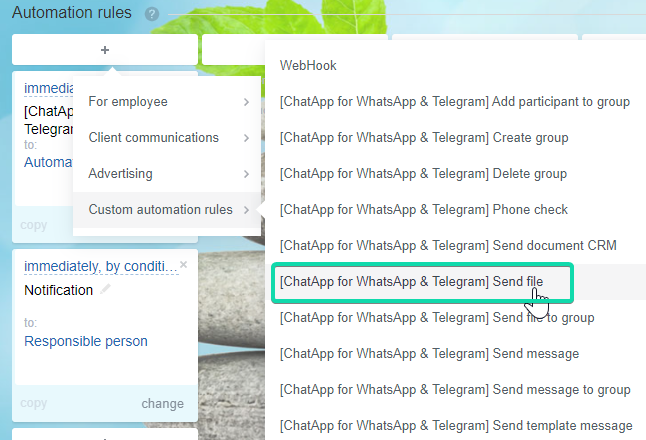
2. Select the automation rule on the board
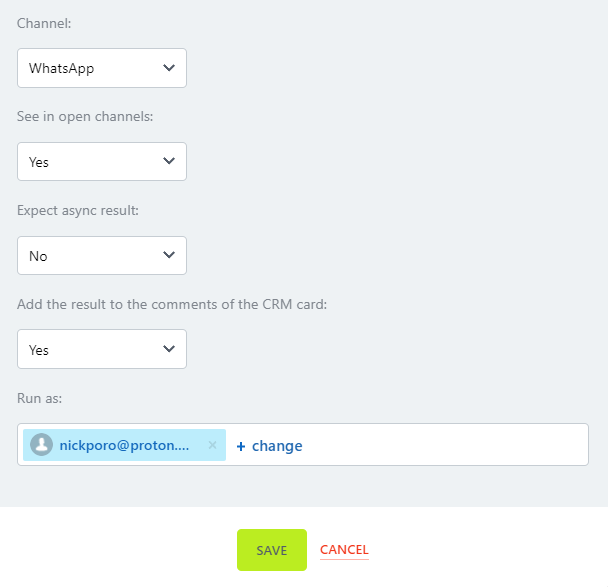
3. Fill in the parameters fields.
- Phone – specify one or more phone numbers for sending a message (if you specify several numbers, be sure to use the delimiters “comma” or “semicolon”).
- Chat ID – specify chat id from ChatApp Dialog or @username of Telegram user if phone number is not available.
- Messenger – specify the messenger from the deal or lead card using the field mask. This field is required when the contact’s phone number or other details are not available.
- File ID – see below.
- First and Last name– these data will be filled in only for the Telegram messenger. Contacts are filled in the messenger directory and displayed in dialogs.
- License ID – fill in the ID of the license that you will use to send the message. You can leave this field blank if you only have one active license.
- Channel – the channel through which the file will be sent.
- Asynchronous result – allows to get exact data about message sending. Read more in the article.
- Add result to CRM card comments – Display message sending status.
How to determine the file ID?
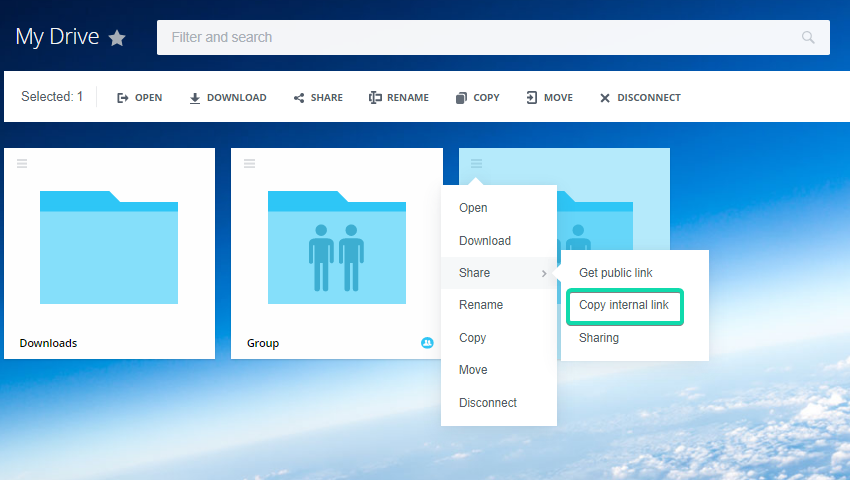
- On the Bitrix24 portal, go to the “Disk” section.
- In the context menu of the file, select Share, Copy internal link.
- See the copied link, for this paste the link into any text editor, such as Notepad.
Example link: https://portal-sun.bitrix24.ru/disk/showFile/241048/?&ncc=1&ts=1587811745&filename=2020%252F4%252F25%252F99a2c507-511f-49db-82ba-eda5426cafee.jpeg The file ID is the number that comes after https://ank26.bitrix24.ru/disk/showFile/. In the example, ID = 241048.
File ID – it’s id, then after https: //portal-sun.bitrix24.ru/disk/showFile/. example ID = 241048.
