
+7 495 255 06 20
Log In Free trial
Select Language
December 9, 11:00 AM

Digital Reception: How to Increase Your Hotel’s Revenue by 30%?

Join the webinar to learn how a digital staff member answers guests 24/7, boosts loyalty and NPS through personalized communication and attentive service!
Participate for free

ChatApp integrates messengers and communication services into Kommo. Thanks to the integration, many communication methods become available and much more convenient to use directly from the crm system.

What channels does ChatApp integrate into Kommo?
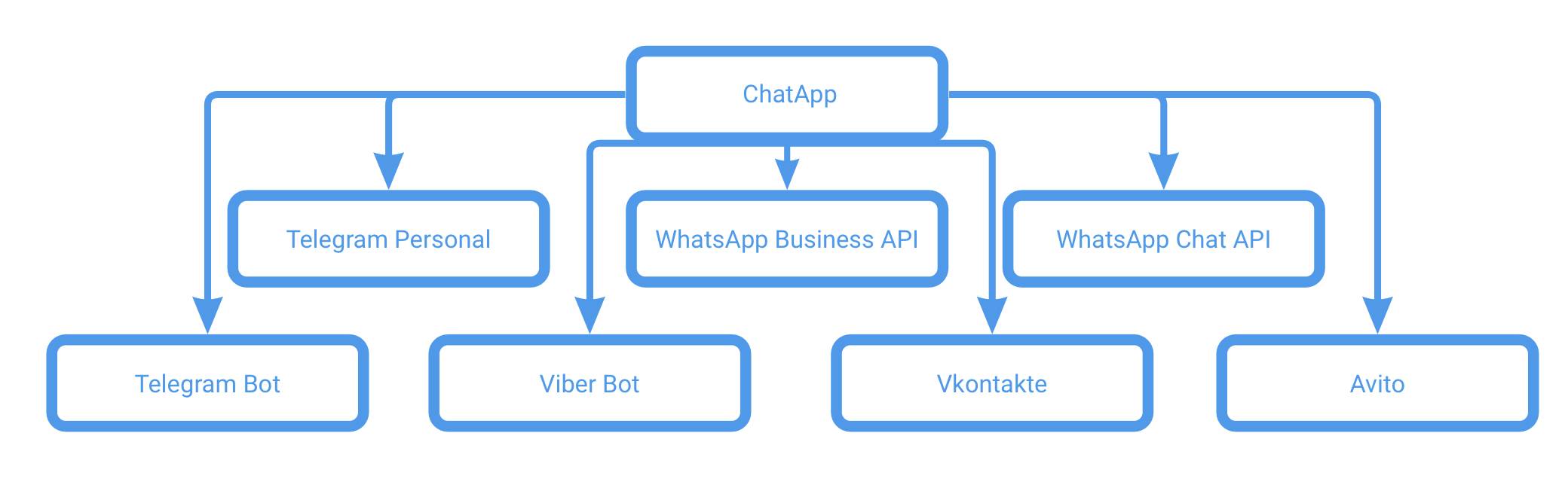


In Kommo, you do not need to connect each messenger separately. It is enough to install the ChatApp widget and all channels on a paid license, as well as WEB-chat, will become available for use.

In amoCRM you can use:

What are the benefits of ChatApp integrations?

All ChatApp integrations share common features that each licensed channel used in Kommo has.

Advantages of ChatApp messengers

Each connected ChatApp messenger has a lot of functionality compared to the standard Kommo integration. Delivery and read statuses of messages, verification of numbers, the ability to start a dialogue by the user's phone number and much more.

  • Support for message delivery and reading statuses;
  • It is possible to send a template message from the chat, as well as use Salesbot to send a template message;
  • Ability to work with a single web chat ChatApp WEB;
  • Support for the ChatApp quick response bot and setting up auto-replies;
  • Using the database of quick responses;
  • Management of the black list of contacts;
  • ChatApp messaging widget for Salesbot available;
  • A script is available to select the message source, license, messenger, and message template for outgoing messages in Salesbot.
  • Support for message delivery and reading statuses;
  • Possibility to start a dialogue by WhatsApp user's phone number;
  • WhatsApp user phone number verification;
  • Support for group chats;
  • Reflection in the chat that was sent from the native WhatsApp application (integrated account);
  • Ability to work with a single web chat ChatApp WEB;
  • Support for the ChatApp quick response bot and setting up auto-replies;
  • Using the database of quick responses;
  • Management of the black list of contacts;
  • ChatApp messaging widget for Salesbot available;
  • A script is available to select the message source, license, messenger, and message template for outgoing messages in Salesbot.
  • Support for message delivery and reading statuses;
  • Ability to start a dialogue by phone number or @username of a Telegram user;
  • Checking the phone number of a Telegram user;
  • Support for group chats;
  • Reflection in the chat of messages that were sent from the native Telegram application (integrated account);
  • Ability to work with a single web chat ChatApp WEB;
  • Support for the ChatApp quick response bot and setting up auto-replies;
  • Using the database of quick responses;
  • Management of the black list of contacts;
  • ChatApp messaging widget for Salesbot available;
  • A script is available to select the message source, license, messenger, and message template for outgoing messages in Salesbot.
  • Support for group chats;
  • Support for quoting incoming messages;
  • Ability to work with a single web chat ChatApp WEB;
  • Support for the ChatApp quick response bot and setting up auto-replies;
  • Using the database of quick responses;
  • Management of the black list of contacts;
  • ChatApp messaging widget for Salesbot available;
  • A script is available to select the message source, license, messenger, and message template for outgoing messages in Salesbot.
  • Support for message delivery and reading statuses;
  • Ability to work with a single web chat ChatApp WEB;
  • Support for the ChatApp quick response bot and setting up auto-replies;
  • Using the database of quick responses;
  • Management of the black list of contacts;
  • ChatApp messaging widget for Salesbot available;
  • A script is available to select the message source, license, messenger, and message template for outgoing messages in Salesbot.
  • Support for comments on posts, products and services;
  • Support for quoting incoming messages;
  • Reflection in the chat of messages that were sent from the native Vkontakte application (integrated account);
  • Ability to work with a single web chat ChatApp WEB;
  • Support for the ChatApp quick response bot and setting up auto-replies;
  • Using the database of quick responses;
  • Management of the black list of contacts;
  • ChatApp messaging widget for Salesbot available;
  • A script is available to select the message source, license, messenger, and message template for outgoing messages in Salesbot.
  • Reflection in the chat of messages that were sent from the native Avito application (integrated account);
  • Ability to work with a single web chat ChatApp WEB;
  • Support for the ChatApp quick response bot and setting up auto-replies;
  • Using the database of quick responses;
  • Management of the black list of contacts;
  • ChatApp messaging widget for Salesbot available;
  • A script is available to select the message source, license, messenger, and message template for outgoing messages in Salesbot.

How to install ChatApp widget in Kommo→

How to export contacts from Kommo to a mobile device →