



When the bot constructor receives a webhook request and then initiates a dialog, it is possible that the client is not available on the selected messenger. Use the results of block execution to ensure that the message gets delivered to the client.
How to achieve this:
1. Create an incoming webhook block;
2. Connect the “Sending a message*” block to it. Enter ChatID, line, and messenger details;
3. Create a “Condition” block;
4. Click “Add Condition” twice;
5. In the condition, select the result of the “Sending a message*” block – Success;
6. To the right of the results, select “=” and write “True” and “False”;
7. For “True,” draw an arrow to continue the script, and for “False,” repeat steps 2-6 with other messengers;
8. In the end, it should look like the screenshot:
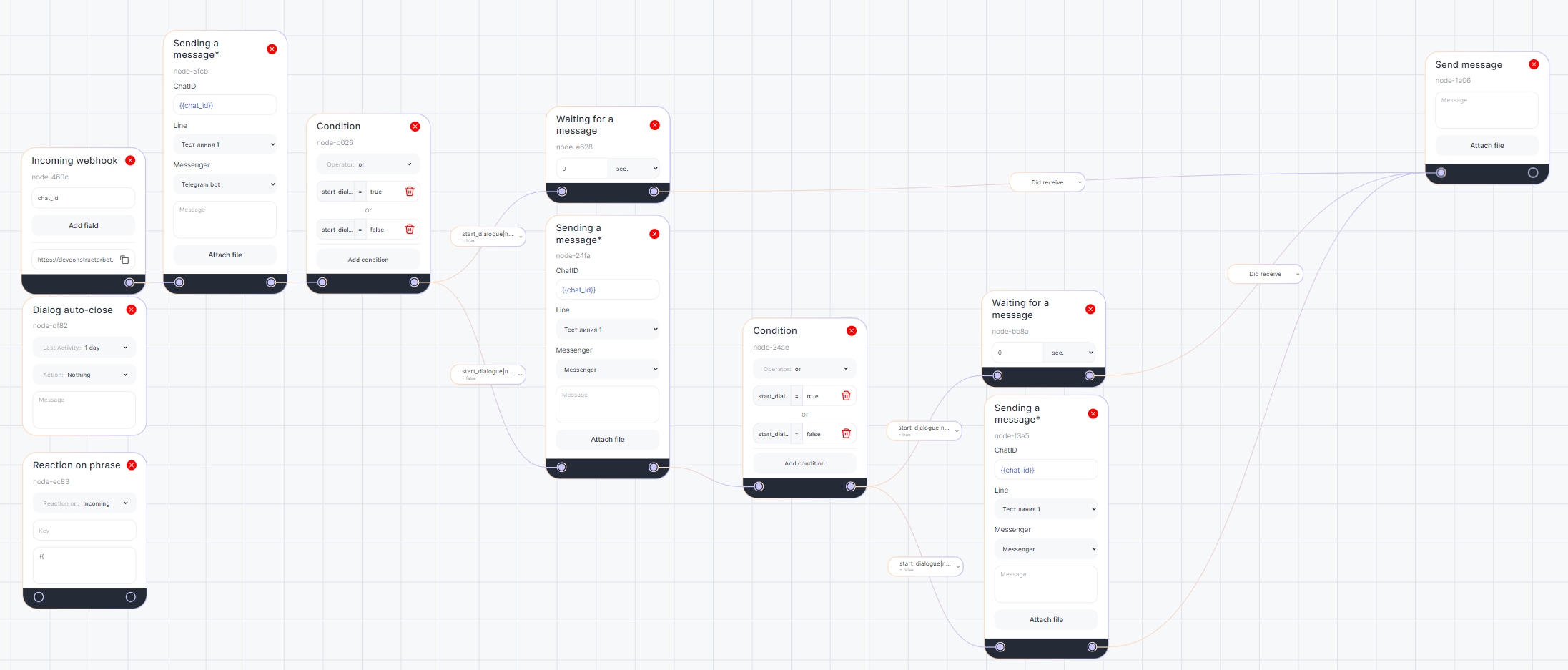
Done! Now the bot will send the message first to one messenger, and if it fails, it will try others as many times as you configure.
This feature does not work with the WhatsApp Business API.
For the script to work correctly with regular WhatsApp, place the “Pause” block in front of the “Condition”.
