+7 495 255 06 20
Log In Free trial
Select Language
December 9, 11:00 AM

Digital Reception: How to Increase Your Hotel’s Revenue by 30%?

Join the webinar to learn how a digital staff member answers guests 24/7, boosts loyalty and NPS through personalized communication and attentive service!
Participate for free

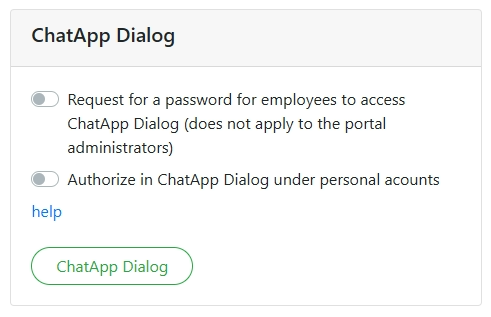
Disabled — ChatApp Dialog will open from Bitrix24 without authorization;
Enabled — ChatApp Dialog will open from Bitrix24 with a login and password request. For administrators of the Bitrix24 portal, ChatApp Dialog will always open without authorization.

Disabled — Any employee will be able to open ChatApp Dialog from Bitrix24 without authorization as an administrator.

Enabled An employee will be able to open ChatApp Dialog from Bitrix24 without authorization under the corresponding employee of the personal account.

To enable this option you need to:
1.  In your ChatApp personal cabinet, link the Bitrix24 portal to the company.
2. In your ChatApp personal cabinet, set up roles and employees, and also link your ChatApp personal cabinet employees with your Bitrix24 portal employees.